
Creating Products
Register a new plugin or theme in LicenceForge by navigating to LicenceForge → Products → Add Product in your WordPress admin. The product form is divided into sections covering identity, versioning, and distribution.
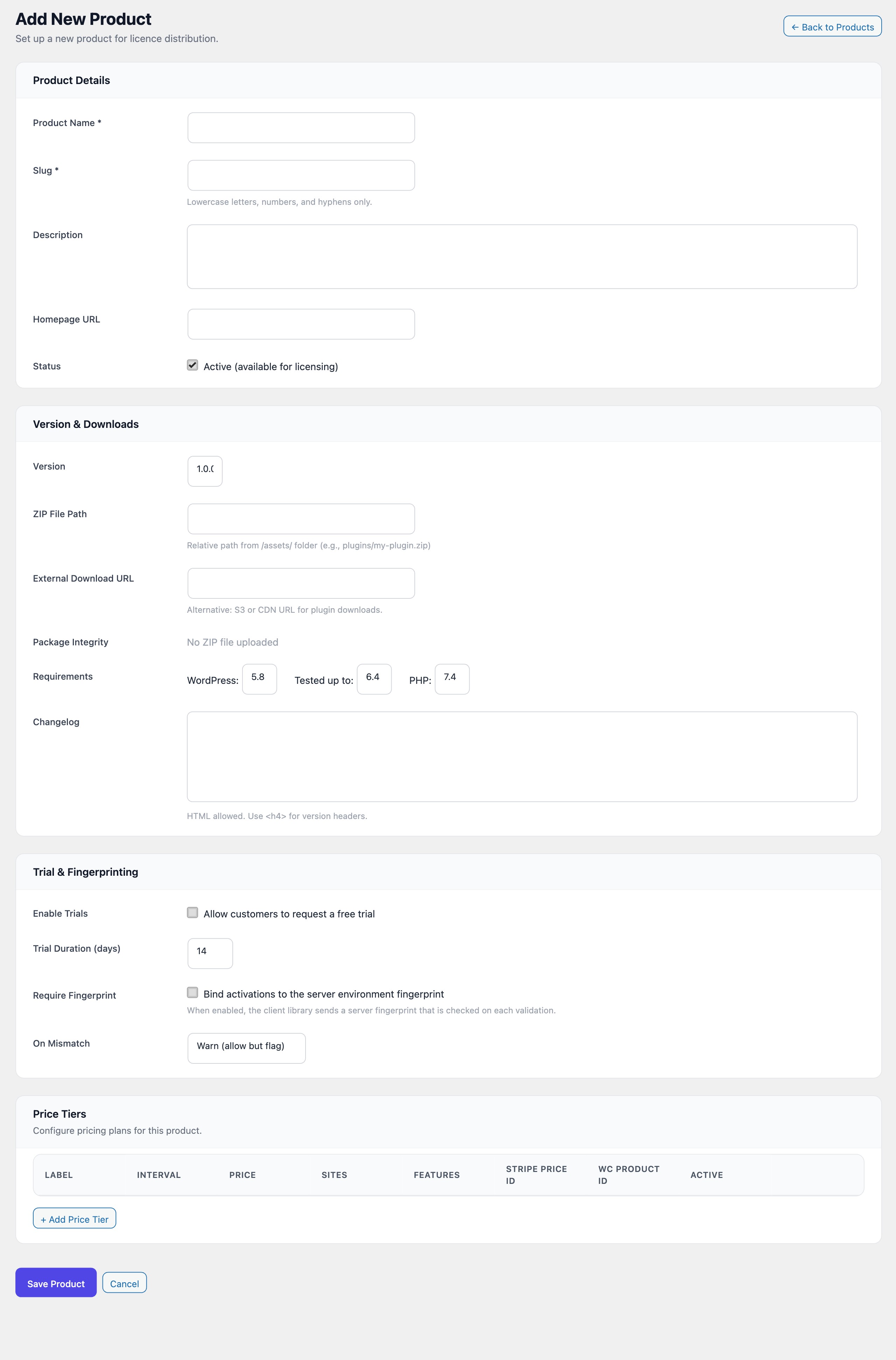
Product details
The Product Details section captures the core identity of your plugin or theme.
| Field | Type | Required | Default | Description |
|---|---|---|---|---|
name |
text | Yes | — | The display name of the product (e.g. "AcmeForms Pro"). |
slug |
text | Yes | — | Unique identifier used in API calls. Pattern: [a-z0-9-]+ |
description |
textarea | No | — | Internal description of the product. Not displayed to end users. |
homepage_url |
url | No | — | Public-facing product page URL. Returned in the update API response. |
is_active |
checkbox | No | true | Controls whether the product is available for licensing. Unchecking hides it from the API without affecting existing licences. |
Slug requirements
The slug is the permanent identifier for your product across the entire LicenceForge system. It appears in:
- REST API endpoints:
/wplf/v1/license/validate?product=your-slug - Client library configuration:
new WPLF_Client('your-slug', ...) - Database queries and webhook payloads
Warning
Choose the slug carefully. Changing it later requires updating every client installation, Stripe webhook mapping, and WooCommerce integration. The slug must contain only lowercase letters, numbers, and hyphens.
Version and downloads
The Version & Downloads section controls what version clients see and where they download updates from.
| Field | Type | Default | Description |
|---|---|---|---|
latest_version |
text | 1.0.0 |
Current version string. Compared against client-side version for update detection. |
zip_path |
text | — | Relative path from the /assets/ folder (e.g. plugins/my-plugin.zip). |
external_url |
url | — | Alternative download URL for S3 or CDN-hosted packages. Takes precedence over zip_path. |
Tip
Use external_url for production deployments. Hosting packages on an S3-compatible service with pre-signed URLs provides better performance and security than local file storage.
WordPress compatibility
These fields populate the WordPress update API response, allowing WordPress to show compatibility information in the admin dashboard.
| Field | Type | Default | Description |
|---|---|---|---|
requires_wp |
text | 5.8 |
Minimum WordPress version required. |
tested_wp |
text | 6.4 |
Highest WordPress version tested against. |
requires_php |
text | 7.4 |
Minimum PHP version required. |
Changelog
The changelog field accepts HTML content. When you update a version through the admin UI or the update_version() method, new entries are automatically prepended with a version header:
<h4>1.2.0 - 2025-03-15</h4>
Added: New analytics dashboard
Fixed: Licence validation timeout on slow connections

<h4>1.1.0 - 2025-01-20</h4>
Added: WooCommerce integration
Improved: Key generation performance
Next steps
After creating a product, configure its pricing and distribution:
- Define price tiers with billing intervals and activation limits
- Upload a version package and recalculate the integrity hash
- Generate your first licence or connect a payment provider for automatic creation