
Stripe Webhooks
LicenceForge processes Stripe webhook events to create licenses, manage subscription lifecycle changes, and handle refunds and disputes in real time.
Webhook URL
Register the following URL as a webhook endpoint in your Stripe Dashboard:
{site_url}/wp-json/wplf/v1/webhooks/stripeReplace {site_url} with your WordPress site URL. For example:
https://example.com/wp-json/wplf/v1/webhooks/stripeStripe Dashboard setup
- Go to Developers > Webhooks in the Stripe Dashboard.
- Click Add endpoint.
- Paste your webhook URL.
- Select the events listed in the Handled Events section below.
- Click Add endpoint to save.
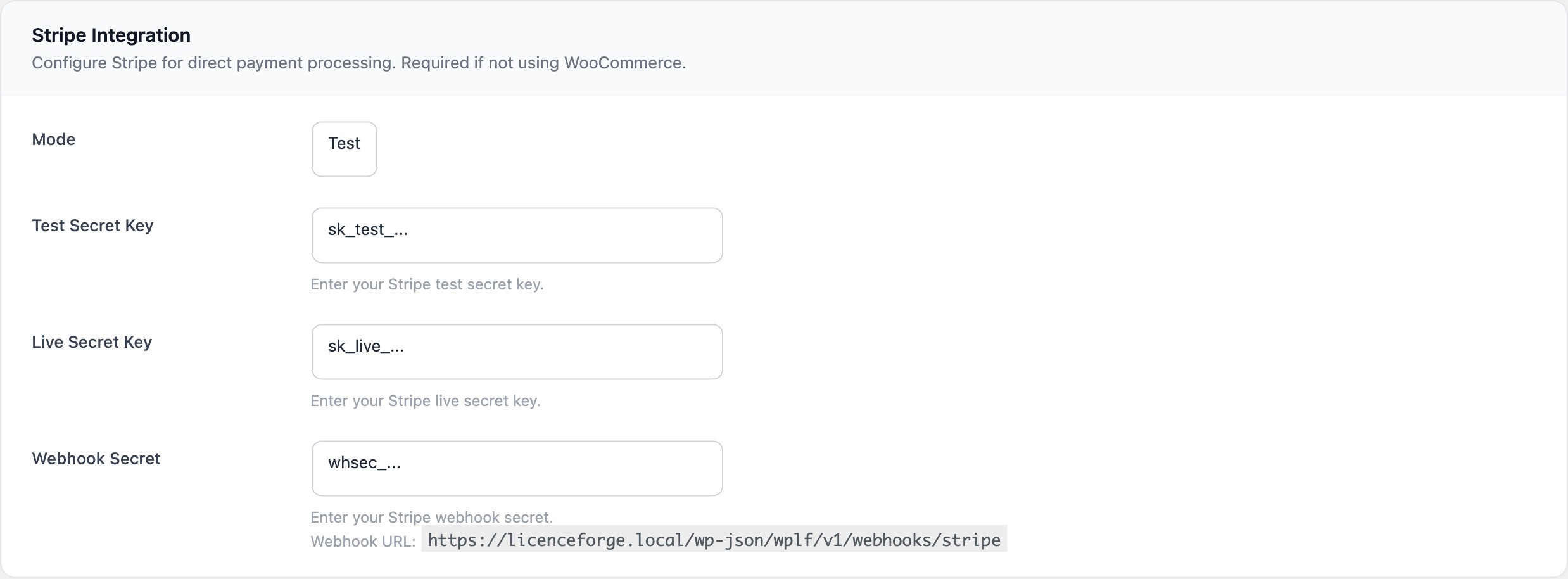
- Copy the Signing secret (starts with
whsec_) and paste it into LicenceForge > Settings > Stripe > Webhook Secret.
Signature Verification
Every incoming webhook request is verified using HMAC-SHA256 signature verification. LicenceForge checks the Stripe-Signature header against the webhook signing secret to ensure the request originated from Stripe.
- Algorithm: HMAC-SHA256
- Timestamp tolerance: 5 minutes — requests with timestamps older than 5 minutes are rejected to prevent replay attacks
If signature verification fails, the webhook returns a 400 status and the event is not processed. Common causes include an incorrect webhook secret, clock skew greater than 5 minutes, or a request body that was modified in transit (e.g., by a caching proxy).
Handled Events
LicenceForge processes the following 9 Stripe event types. Register all of these when creating your webhook endpoint.
| Event | Action |
|---|---|
checkout.session.completed |
Creates a new license and sends the license delivery email to the customer. |
invoice.payment_succeeded |
Reactivates the license (if suspended) and updates the period end date to the next billing cycle. |
invoice.payment_failed |
Marks the license as expired. |
customer.subscription.updated |
Maps the Stripe subscription status to the corresponding license status (see mapping table below). |
customer.subscription.deleted |
Cancels the license. |
charge.refunded |
Full refund: suspends the license. Partial refund: logs the event without changing license status. |
charge.dispute.created |
Suspends the license immediately. |
charge.dispute.closed |
If the merchant won: reactivates the license. If the merchant lost: logs the outcome. |
Subscription status mapping
When a customer.subscription.updated event is received, the Stripe subscription status is mapped to a LicenceForge license status:
| Stripe subscription status | LicenceForge license status |
|---|---|
active |
Active |
past_due |
Active |
unpaid |
Expired |
canceled |
Cancelled |
incomplete |
Suspended |
incomplete_expired |
Expired |
trialing |
Active |
// Stripe subscription status to LicenceForge license status
$stripe_status_map = [
    'active'             => 'active',
    'past_due'           => 'active',
    'unpaid'             => 'expired',
    'canceled'           => 'cancelled',
    'incomplete'         => 'suspended',
    'incomplete_expired' => 'expired',
    'trialing'           => 'active',
];
License creation hook
When a license is created from a checkout.session.completed event, the following action fires:
do_action( 'wplf_license_created_from_stripe', $license, $session );| Parameter | Type | Description |
|---|---|---|
$license |
WPLF_License |
The newly created license object |
$session |
object |
The Stripe Checkout Session object from the webhook payload |
Idempotent Processing
Stripe may deliver the same webhook event more than once. LicenceForge ensures each event is processed exactly once by storing event IDs with a UNIQUE constraint in the database.
-- Event is inserted with INSERT IGNORE
-- If the event_id already exists, the insert is silently skipped
INSERT IGNORE INTO wp_wplf_webhook_events (event_id, event_type, processed_at)
VALUES ('evt_1abc123', 'checkout.session.completed', NOW());
If the event_id already exists in the table, INSERT IGNORE silently skips the insertion and the event is not reprocessed.
Retry Mechanism
If a webhook event fails to process (e.g., due to a temporary database error), LicenceForge queues it for retry with exponential backoff.
Configuration
| Setting | Value |
|---|---|
| Maximum retries | 5 (MAX_RETRIES = 5) |
| Cron hook | wplf_webhook_retry |
| Cron interval | Every 5 minutes |
| Batch size | Up to 10 events per cron run |
Retry delays (exponential backoff)
| Attempt | Delay | Cumulative wait |
|---|---|---|
| 1 | 1 minute | 1 minute |
| 2 | 5 minutes | 6 minutes |
| 3 | 15 minutes | 21 minutes |
| 4 | 1 hour | 1 hour 21 minutes |
| 5 | 4 hours | 5 hours 21 minutes |
After 5 failed attempts, the event is marked as permanently failed and logged. An admin notice is displayed in the LicenceForge dashboard when there are permanently failed webhook events that require manual review.
The retry mechanism relies on WordPress cron (wp-cron.php). If your site has low traffic, consider setting up a system-level cron job to trigger wp-cron.php reliably. See Cron Jobs for details.
Troubleshooting
Common issues
| Symptom | Likely cause | Resolution |
|---|---|---|
| Webhooks return 400 | Incorrect webhook signing secret | Verify the whsec_ value in LicenceForge settings matches the one in Stripe Dashboard |
| Webhooks return 400 intermittently | Server clock drift > 5 minutes | Synchronise your server clock with NTP |
| License not created after checkout | checkout.session.completed event not registered |
Verify all required events are selected in the Stripe webhook endpoint configuration |
| Duplicate events in logs | Multiple webhook endpoints configured | Ensure only one webhook endpoint points to your LicenceForge URL per Stripe mode |
| Retry cron not running | WordPress cron disabled or unreliable | Set up a system-level cron to call wp-cron.php |