
Device Fingerprinting
Device fingerprinting adds an additional layer of license enforcement by tracking the server environment where a license is activated. When enabled, LicenceForge collects a hash of server attributes and can detect when a license is used on a different server than originally activated.
Product settings
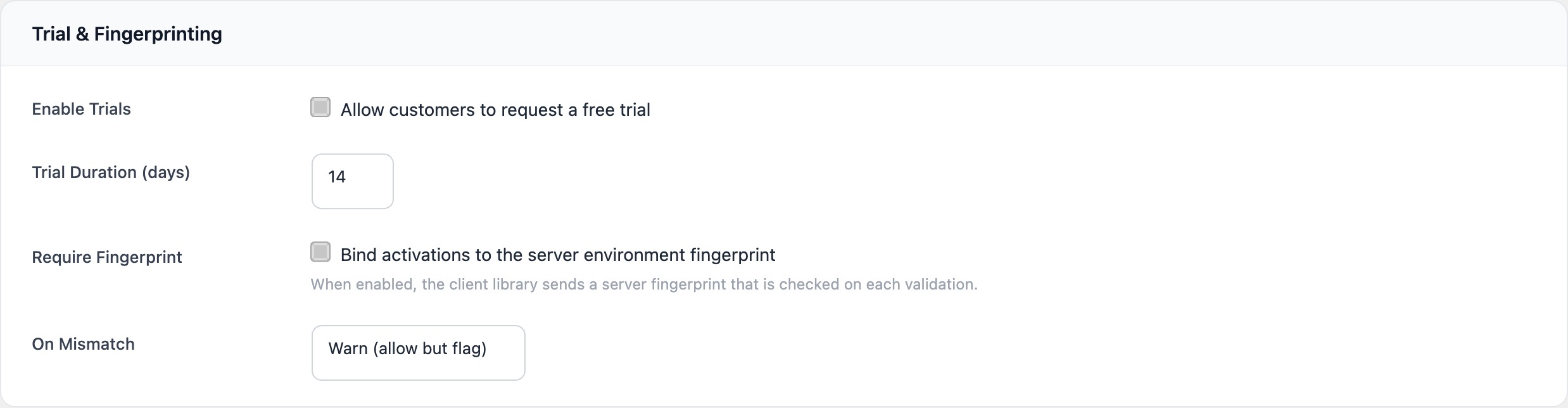
Fingerprinting is configured at the product level under LicenceForge > Products > Edit > Licensing. Two settings control the behaviour:
| Setting | Type | Default | Description |
|---|---|---|---|
require_fingerprint |
Checkbox | Unchecked | When checked, the client library must include a server fingerprint with every activation and validation request. If the fingerprint is missing from a request, activation is rejected. |
fingerprint_mismatch_action |
Select | warn |
Determines what happens when the fingerprint submitted during validation does not match the fingerprint stored at activation. Options: warn or block. |
Note
Fingerprinting is optional and disabled by default. Enable it only for products where server identity tracking is important, such as premium plugins or themes where unauthorized redistribution is a concern.
Fingerprint composition
The fingerprint is a SHA-256 hash computed from a concatenation of server environment attributes. The client library collects the following values from the server where the plugin or theme is installed:
| Attribute | PHP source | Example value |
|---|---|---|
| PHP version | PHP_VERSION |
8.2.15 |
| Server software | $_SERVER['SERVER_SOFTWARE'] |
Apache/2.4.58 |
| Document root | $_SERVER['DOCUMENT_ROOT'] |
/var/www/html |
| Database host | DB_HOST |
localhost |
| OS identifier | PHP_OS |
Linux |
| Server name | $_SERVER['SERVER_NAME'] |
example.com |
| Temp directory | sys_get_temp_dir() |
/tmp |
These values are concatenated with a pipe (|) delimiter and hashed:
$components = [
    PHP_VERSION,
    $_SERVER['SERVER_SOFTWARE'] ?? '',
    $_SERVER['DOCUMENT_ROOT'] ?? '',
    defined( 'DB_HOST' ) ? DB_HOST : '',
    PHP_OS,
    $_SERVER['SERVER_NAME'] ?? '',
    sys_get_temp_dir(),
];

$fingerprint = hash( 'sha256', implode( '|', $components ) );
The resulting fingerprint is a 64-character hexadecimal string. Only the hash is transmitted to the LicenceForge server—the raw server attributes are never sent, preserving the privacy of the client site's server configuration.
Fingerprint storage
The fingerprint is stored in the server_fingerprint column of the wplf_activations table. It is recorded at the time of activation and serves as the baseline for future comparisons.
When fingerprinting is not required for a product, the server_fingerprint column is left NULL. If a fingerprint is submitted for a product that does not require it, the value is still stored (for informational purposes) but is never checked during validation.
Validation behaviour
On each validation request, the client library recomputes the fingerprint and includes it in the request payload. The LicenceForge server compares the submitted fingerprint against the stored value for the matching activation record.
Fingerprint matches
If the submitted fingerprint matches the stored value, validation proceeds normally. No additional flags are set in the response.
Fingerprint does not match
If the submitted fingerprint does not match the stored value, the response depends on the fingerprint_mismatch_action setting:
| Action | Validation result | Response behaviour |
|---|---|---|
warn |
Passes | Validation succeeds, but the response includes a fingerprint_mismatch flag set to true and a warning message. The mismatch is logged in the audit trail. |
block |
Fails | Validation is rejected with HTTP status 403 and the error code wplf_fingerprint_mismatch. The rejection is logged in the audit trail. |
Warn response example
{
  "valid": true,
  "status": "active",
  "fingerprint_mismatch": true,
  "message": "License validated, but the server fingerprint does not match the original activation environment."
}
Block response example
{
  "valid": false,
  "error": "wplf_fingerprint_mismatch",
  "message": "Validation rejected: server fingerprint does not match the activation record."
}
Common mismatch causes
Fingerprint mismatches do not always indicate unauthorized use. Legitimate reasons for a changed fingerprint include:
- Server migration — The site was moved to a new hosting provider or server.
- PHP upgrade — The server's PHP version was updated (e.g., 8.1 to 8.2).
- Server software update — Apache or Nginx was updated, changing the
SERVER_SOFTWAREstring. - Staging to production — The site was activated on a staging server and then deployed to production with different server attributes.
- Container redeployment — Docker or Kubernetes environments where server attributes change between deployments.
Note
For sites hosted in containerised or ephemeral environments, consider using the warn mismatch action rather than block to avoid false rejections when infrastructure changes occur.
Resetting a fingerprint
If a legitimate server change causes a mismatch, the fingerprint can be reset through two methods:
Admin reset
On the license detail page, each activation row displays the stored fingerprint (truncated). Clicking Reset Fingerprint clears the stored value. The next validation request from the site will store the new fingerprint as the baseline.
Deactivate and reactivate
Deactivating the site and reactivating it will record a new fingerprint at activation time. This is the recommended approach when the customer has migrated to an entirely new server and can manage the activation themselves from the client library.
Hooks
LicenceForge provides hooks to customise fingerprint behaviour:
// Filter the fingerprint components before hashing
// Useful for adding or removing attributes
add_filter( 'wplf_fingerprint_components', function ( $components ) {
    // Remove temp directory (changes frequently in some environments)
    unset( $components[6] );
    return $components;
} );

// Action fired on fingerprint mismatch (regardless of action setting)
add_action( 'wplf_fingerprint_mismatch', function ( $license_id, $activation_id, $stored, $submitted ) {
    // Custom logging or alerting
}, 10, 4 );
Security considerations
Device fingerprinting is a supplementary enforcement mechanism, not a standalone security solution. Keep the following in mind:
- The fingerprint is computed on the client side. A determined attacker who has access to the plugin source code could modify the client library to send the expected fingerprint.
- Fingerprinting is most effective as a deterrent against casual redistribution, where the recipient installs the plugin on a different server without modifying the code.
- For stronger protection, combine fingerprinting with activation limits and regular validation checks via the client library.
- The raw server attributes are never transmitted—only the SHA-256 hash—so no sensitive server configuration data leaves the client site.