
First-Time Setup
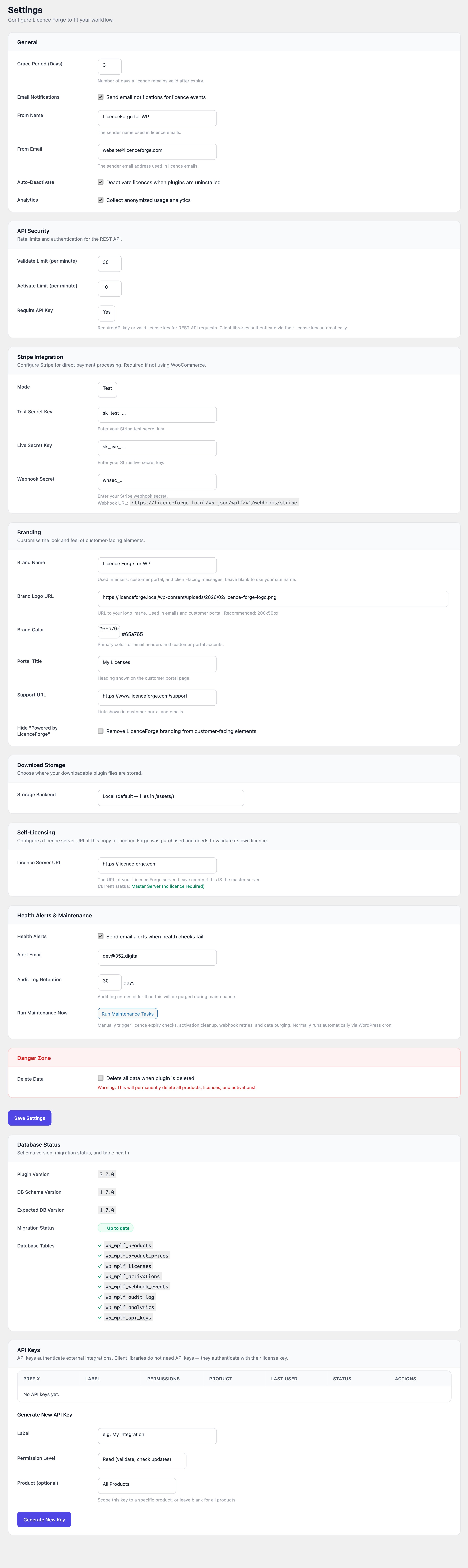
After installing and activating LicenceForge, head to Licences > Settings to configure the plugin. This page walks through every settings section so you can get up and running quickly.
Tip
The defaults are sensible for most setups. If you just want to test locally, the only section you must configure is Stripe (or skip it entirely and issue manual licenses).
General Settings
Core behaviour that affects how licenses are managed across the system.
| Setting | Default | Description |
|---|---|---|
| Grace Period Days | 3 |
Number of days (0--30) after a license's current_period_end before its status is changed to expired. During the grace period, the license remains active so customers are not immediately cut off if a payment is delayed. |
| Email Notifications | Enabled | Toggle all outbound email notifications (license issued, expiration warnings, trial reminders). Individual templates can be customized under Licences > Emails. |
| From Name | (blank -- uses site name) | Sender name on outbound license emails. |
| From Address | (blank -- uses admin email) | Sender email address for notifications. |
| Auto-Deactivate | Enabled | When a license expires or is cancelled, automatically deactivate all associated site activations during the daily maintenance cron. |
| Analytics | Enabled | Record validation and activation events in the wplf_analytics table. Used for version distribution charts and daily active site metrics. Disable to reduce database writes on high-traffic servers. |
| Audit Log Retention | 90 days |
How long audit log entries are kept before the daily maintenance cron purges them. Accepted range: 7--365 days. |
API Security
These settings control rate limiting and authentication for the REST API endpoints that your client plugins call.
| Setting | Default | Description |
|---|---|---|
| Validate Rate Limit | 30/min |
Maximum licenses/validate requests per minute per IP address. The client library caches results for 1 hour, so this limit is rarely hit in practice. |
| Activate Rate Limit | 10/min |
Maximum licenses/activate requests per minute per IP address. Set lower than validation since activation is a less frequent operation. |
| Require API Key | yes |
When set to yes, all REST API requests must include a valid API key in the X-LicenceForge-Key header. Set to no during development if you want open access. See API documentation for details. |
Warning
Disabling API key requirements on a production site exposes your license endpoints to unauthenticated access. Always set Require API Key to yes in production.
Stripe Integration
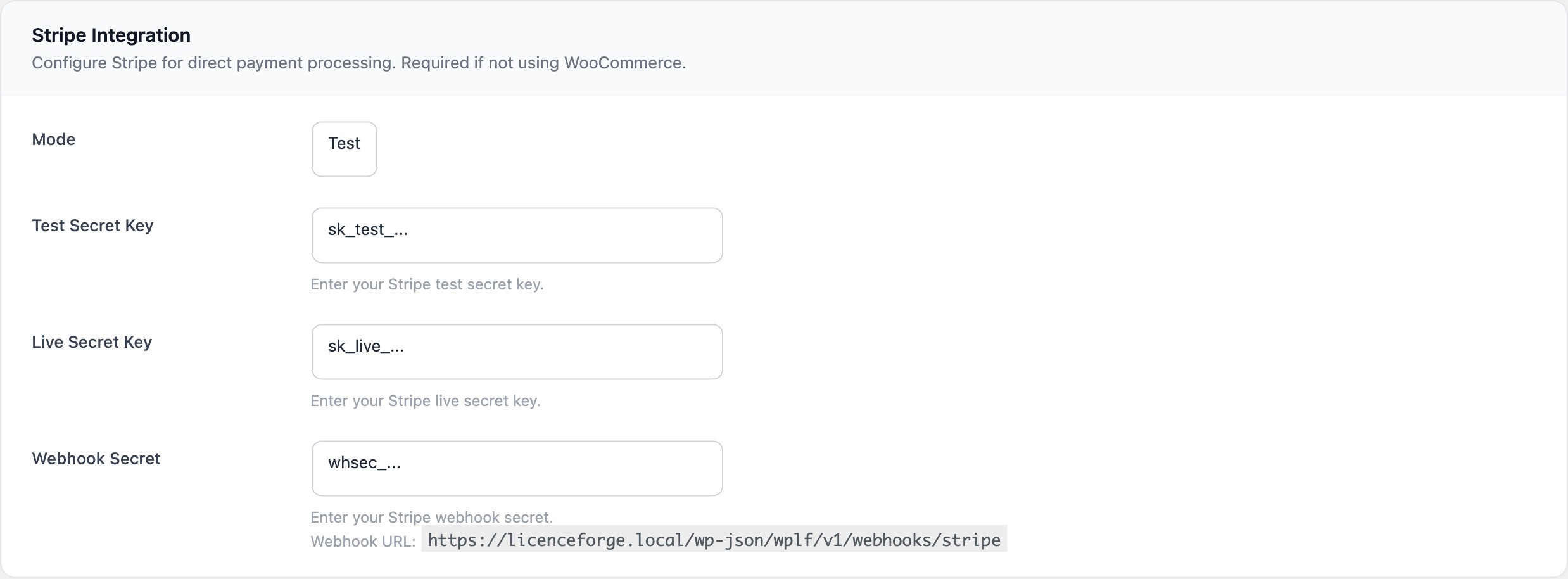
Connect your Stripe account to automate license creation and renewal when customers purchase or subscribe.
| Setting | Default | Description |
|---|---|---|
| Mode | test |
Toggle between Stripe test and live environments. Switch to live only when you are ready to process real payments. |
| Test Secret Key | (empty) | Your Stripe test secret key (sk_test_...). Encrypted at rest using AES-256-CBC with keys derived from AUTH_KEY and SECURE_AUTH_KEY. |
| Live Secret Key | (empty) | Your Stripe live secret key (sk_live_...). Also encrypted at rest. |
| Webhook Secret | (empty) | The signing secret from your Stripe webhook endpoint (whsec_...). Required to verify incoming webhook payloads. |
Setting Up the Stripe Webhook
- In the Stripe Dashboard, go to Developers > Webhooks.
- Click Add endpoint.
- Set the URL to:
https://yoursite.com/wp-json/wplf/v1/webhooks/stripe - Select these events:
checkout.session.completed,customer.subscription.updated,customer.subscription.deleted,invoice.payment_succeeded,invoice.payment_failed,charge.refunded. - Copy the Signing secret and paste it into the Webhook Secret field in LicenceForge settings.
Branding
Customize the appearance of customer-facing elements such as the license portal and email templates.
| Setting | Description |
|---|---|
| Brand Name | Displayed in email headers and the license portal. Falls back to the WordPress site name if blank. |
| Brand Logo URL | URL to a logo image shown in email templates. Recommended dimensions: 200x50px. |
| Brand Color | Hex color code (default: #0073aa) used for email headers and portal accents. |
| Portal Title | Custom title for the customer license management portal. |
| Support URL | Link included in license emails directing customers to your support system. |
| Hide Branding | Remove "Powered by LicenceForge" from email footers. |
Storage
Choose where plugin ZIP files are stored for distribution to licensed customers.
Local Storage (Default)
ZIP files are stored in the licenceforge/assets/ directory within the plugin folder. This works out of the box with no extra configuration. The health check will warn you if the assets directory is not writable or disk space is low.
S3-Compatible Storage
For production deployments, you can store ZIP files on any S3-compatible service (AWS S3, Cloudflare R2, DigitalOcean Spaces, MinIO, etc.). Time-limited presigned URLs are generated for secure downloads.
| Setting | Default | Description |
|---|---|---|
| Backend | local | Select local or s3. |
| S3 Endpoint | (empty) | The endpoint URL for your S3-compatible service. |
| S3 Bucket | (empty) | Bucket name where ZIP files are stored. |
| S3 Region | auto | AWS region or auto for services like R2. |
| S3 Access Key | (empty) | Access key ID for the S3 service. |
| S3 Secret Key | (empty) | Secret access key. Encrypted at rest using AES-256-CBC. |
| S3 Prefix | licenceforge/ | Key prefix (folder path) within the bucket. |
| URL Expiry | 300 seconds | How long presigned download URLs remain valid. Accepted range: 60--3600 seconds. |
Tip
After configuring S3, use the Test Connection button on the Settings page to verify connectivity before uploading any ZIP files.
Health Alerts
Proactive monitoring that notifies you when something goes wrong.
| Setting | Default | Description |
|---|---|---|
| Enabled | Disabled | When enabled, the daily maintenance cron runs all health checks and emails you if the overall status is error. |
| Alert Email | (admin email) | The email address that receives health alert notifications. |
Health checks include: cron scheduling, database table integrity, webhook processing, storage availability, REST API reachability, disk space (warns below 500 MB, errors below 100 MB), and PHP version.
Danger Zone
Destructive options that should be used with caution.
Danger
Enabling Delete Data on Uninstall will permanently remove all LicenceForge database tables and options when the plugin is deleted through the WordPress admin. This cannot be undone.
| Setting | Default | Description |
|---|---|---|
| Delete Data on Uninstall | Disabled (false) | When enabled, all 8 database tables and all wplf_* options are deleted when the plugin is uninstalled. Leave disabled to preserve data through reinstalls. |
Saving Settings
Click the Save Settings button at the bottom of the page. Settings are saved via AJAX -- you will see a confirmation message without a page reload. Stripe keys and the S3 secret key are encrypted before being stored in the database.
Next Steps
- Create Your First Product -- Add a product, upload a ZIP, and configure pricing tiers
- API Keys -- Generate API keys for your client plugins
- Email Templates -- Customize the notification emails sent to customers
- Client Library -- Integrate licensing into your plugin or theme