
Rate Limiting
LicenceForge applies per-IP rate limits to all public API endpoints to protect against abuse, brute-force attacks, and accidental request floods. Limits are configurable per endpoint type and enforced using WordPress transients.
How it works
Rate limiting is tracked per IP address using WordPress transients. Each endpoint type has its own counter, stored with the key prefix wplf_rate_ followed by a hash of the IP address and endpoint type. The counter is incremented on each request and expires after 60 seconds (one-minute sliding window).
Tracking flow
- An incoming request hits a rate-limited endpoint.
- LicenceForge retrieves the transient for the client IP and endpoint type.
- If the transient does not exist, it is created with a count of 1 and a 60-second expiration.
- If the transient exists and the count is below the limit, the count is incremented.
- If the count has reached the limit, the request is rejected with HTTP 429.
Default limits
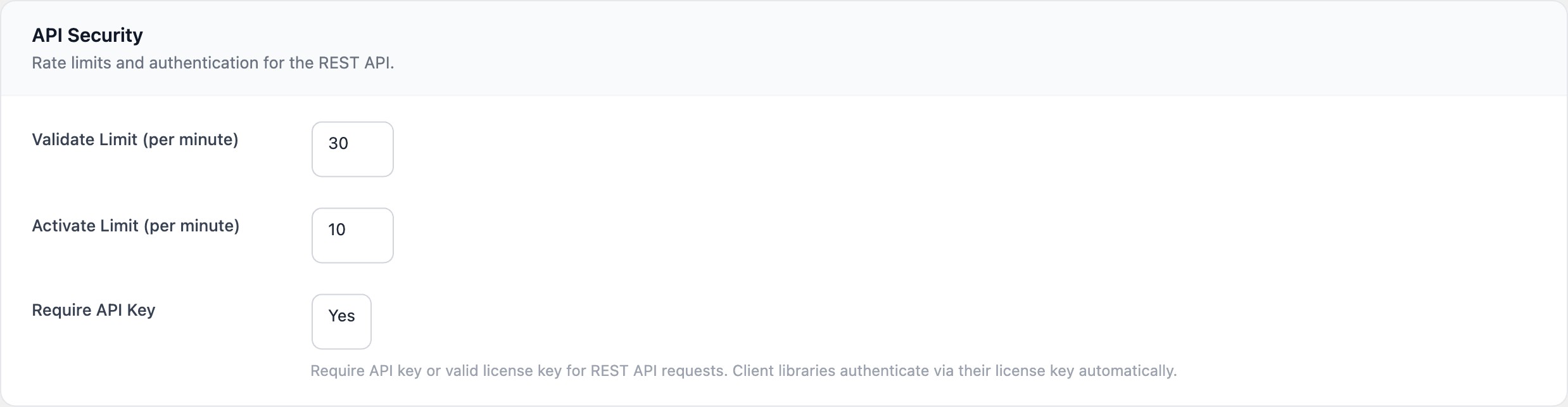
The following per-IP limits are applied by default. Each limit represents the maximum number of requests allowed per minute for that endpoint type.
| Endpoint type | Endpoint path | Default limit |
|---|---|---|
| Validate | /wplf/v1/licenses/validate |
30 requests/min |
| Activate | /wplf/v1/licenses/activate |
10 requests/min |
| Deactivate | /wplf/v1/licenses/deactivate |
10 requests/min |
| Update check | /wplf/v1/updates/check |
60 requests/min |
| Webhook | /wplf/v1/webhooks/stripe |
120 requests/min |
| Trial request | /wplf/v1/trials/request |
5 requests/min |
Configuration
Rate limits can be customised in the WordPress admin panel at LicenceForge > Settings > Rate Limiting. Each endpoint type has its own input field.
Constraints
- Minimum: 1 request per minute
- Maximum: 100 requests per minute
Values outside this range are clamped to the nearest boundary when saved.
Tip
If your client plugin validates on every admin page load, consider caching the validation result locally (the client library does this by default) to avoid hitting the rate limit during active development sessions.
HTTP 429 response
When a rate limit is exceeded, the API returns a 429 Too Many Requests response with a Retry-After header indicating how many seconds the client should wait before retrying.
Response example
HTTP/1.1 429 Too Many Requests
Content-Type: application/json
Retry-After: 45
{
"code": "rate_limit_exceeded",
"message": "Rate limit exceeded for this endpoint. Please retry after 45 seconds.",
"data": {
"status": 429,
"retry_after": 45
}
}Client library handling
The LicenceForge client library automatically handles 429 responses by reading the Retry-After header and backing off for the specified duration before retrying the request. This is transparent to the consuming plugin or theme—no additional error handling is required on the developer's part.
// The client library handles this automatically.
// If you are making direct HTTP requests, implement backoff:
$response = wp_remote_post( $url, $args );
$code     = wp_remote_retrieve_response_code( $response );

if ( $code === 429 ) {
    $retry_after = (int) wp_remote_retrieve_header( $response, 'retry-after' );
    sleep( $retry_after );
    $response = wp_remote_post( $url, $args );  // Retry once
}
Reverse proxy support
By default, LicenceForge reads the client IP from $_SERVER['REMOTE_ADDR']. If your WordPress installation runs behind a reverse proxy (such as Cloudflare, nginx, or a load balancer), the real client IP may be in the X-Forwarded-For or X-Real-IP headers instead.
To enable proxy header support, use the wplf_trust_proxy_headers filter:
add_filter( 'wplf_trust_proxy_headers', '__return_true' );Warning
Only enable proxy header trust if your server is actually behind a trusted reverse proxy. When enabled, LicenceForge reads the IP from X-Forwarded-For, which can be spoofed by clients if no proxy is present. This would allow attackers to bypass rate limiting by sending arbitrary header values.
The default value of this filter is false:
apply_filters( 'wplf_trust_proxy_headers', false )Transient storage
Rate limit counters are stored as WordPress transients with the following key format:
wplf_rate_{endpoint_type}_{ip_hash}Where {endpoint_type} is the type identifier (e.g., validate, activate) and {ip_hash} is an MD5 hash of the client IP address. Transients expire after 60 seconds.
Note
If you are using an external object cache (Redis, Memcached), transients are stored there instead of the database. This provides better performance for high-traffic sites. No additional configuration is needed—WordPress handles the storage backend transparently.
Disabling rate limiting
Rate limiting can be disabled entirely for specific use cases (such as automated testing) by setting all limits to 100 per minute. There is no global "disable" toggle—this is intentional to prevent accidental exposure.
Danger
Do not disable or significantly raise rate limits on production sites. Rate limiting is a critical defence against brute-force licence key guessing and denial-of-service attacks against your validation infrastructure.