
API Key Management
API keys provide token-based authentication for external integrations, CI/CD pipelines, and server-to-server communication with the LicenceForge admin API. Keys are scoped by permission level and optionally restricted to a single product.
Creating API keys
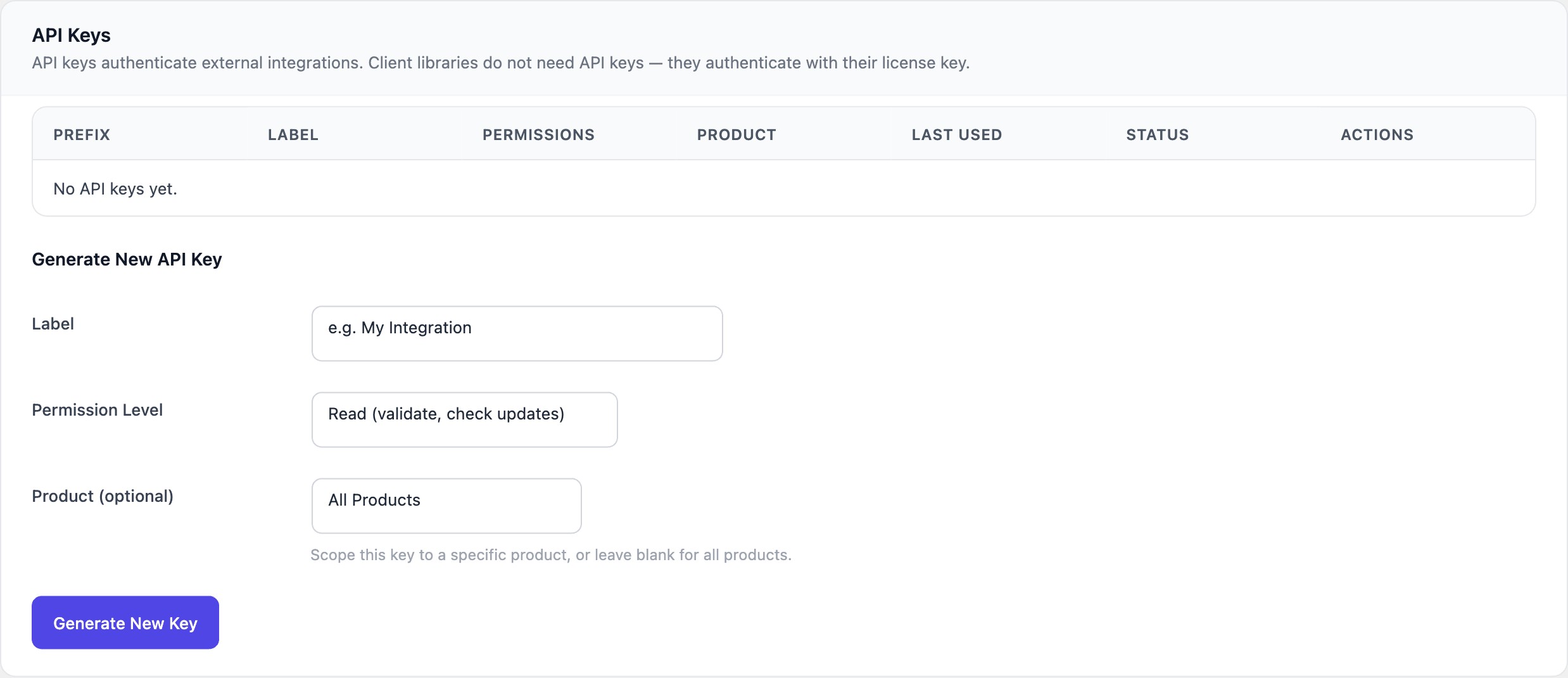
API keys can be created through the WordPress admin panel at LicenceForge > Settings > API Keys, or programmatically via the Create API Key endpoint.
Required fields
| Field | Type | Required | Description |
|---|---|---|---|
label |
string | Yes | A human-readable label to identify the key (e.g., "CI/CD Pipeline", "External Dashboard"). |
permissions |
string | Yes | One of read, write, or admin. |
product_id |
integer|null | No | Restrict the key to a specific product. Set to null (or omit) to grant access to all products. |
Creation example
curl -X POST https://example.com/wp-json/wplf/v1/admin/api-keys \
  -H "X-WP-Nonce: abc123def456" \
  -H "Cookie: wordpress_logged_in_xxx=..." \
  -H "Content-Type: application/json" \
  -d '{
    "label": "Staging Server",
    "permissions": "read",
    "product_id": null
  }'
Response
{
  "id": 7,
  "label": "Staging Server",
  "api_key": "lf_k4j3h2g1f0e9d8c7b6a5z4y3x2w1v0u9t8s7r6q5",
  "permissions": "read",
  "product_id": null,
  "created_at": "2026-02-21T14:00:00Z"
}
Danger
The full API key is displayed exactly once, in the creation response. It is never stored in plaintext and cannot be retrieved again. Copy and store it securely immediately after creation.
Key storage and security
API keys are stored securely using the following approach:
- The full key is generated using a cryptographically secure random generator.
- An 8-character prefix is extracted and stored in plaintext for display purposes (e.g.,
lf_k4j3). - The full key is hashed using SHA-256 before being written to the database.
- On each API request, the incoming key is hashed and compared against the stored hash.
Note
Because only the hash is stored, there is no way to recover a lost API key. If a key is lost, revoke it and create a new one.
Using API keys
Include the API key in the X-LicenceForge-Key header of every request to admin endpoints:
curl -H "X-LicenceForge-Key: lf_k4j3h2g1f0e9d8c7b6a5z4y3x2w1v0u9t8s7r6q5" \
  https://example.com/wp-json/wplf/v1/admin/products
If the key is missing, invalid, or revoked, the API returns:
{
  "code": "unauthorized",
  "message": "A valid API key is required to access this endpoint.",
  "data": {
    "status": 401
  }
}
Permission levels
Each permission level includes the capabilities of all lower levels. The following table shows which endpoint categories each level can access.
| Endpoint category | read (level 1) | write (level 2) | admin (level 3) |
|---|---|---|---|
| List products (GET) | Yes | Yes | Yes |
| List licences (GET) | Yes | Yes | Yes |
| List API keys (GET) | Yes | Yes | Yes |
| Get statistics (GET) | Yes | Yes | Yes |
| Create products (POST) | No | Yes | Yes |
| Update products (PUT) | No | Yes | Yes |
| Create licences (POST) | No | Yes | Yes |
| Update licences (PUT) | No | Yes | Yes |
| Rotate licence keys (POST) | No | Yes | Yes |
| Delete products (DELETE) | No | No | Yes |
| Cancel licences (DELETE) | No | No | Yes |
| Revoke API keys (DELETE) | No | No | Yes |
| Privacy export (POST) | No | No | Yes |
| Privacy erase (POST) | No | No | Yes |
Product scoping
When a product_id is set on an API key, the key can only access data related to that specific product:
- Product endpoints return only the scoped product.
- Licence endpoints filter results to licences belonging to the scoped product.
- Attempts to access other products return a 403 Forbidden response.
Set product_id to null to allow access to all products. This is the default behaviour when the field is omitted.
Tip
Use product-scoped keys when integrating with third-party services that only need access to a single product. This follows the principle of least privilege and limits the blast radius if a key is compromised.
Revoking API keys
Revoke a key by sending a DELETE request to /wplf/v1/admin/api-keys/{id}, or by clicking the Revoke button on the API Keys settings page.
curl -X DELETE \
  -H "X-LicenceForge-Key: lf_admin_key_here..." \
  https://example.com/wp-json/wplf/v1/admin/api-keys/7
Revocation is immediate. Any subsequent requests using the revoked key will receive a 401 Unauthorized response.
Activity monitoring
Each API key tracks a last_used_at timestamp that is updated on every successful request. Use this field to identify stale or unused keys that should be revoked.
The API key list in the admin panel displays the last usage date for each key. Keys that have never been used show "Never" in the last-used column.
Best practices
- Use the lowest permission level that meets your integration needs.
- Scope keys to a specific product when possible.
- Rotate keys periodically—revoke the old key and create a new one.
- Never commit API keys to version control or include them in client-side code.
- Use environment variables or a secrets manager to store keys in production environments.
- Monitor the
last_used_atfield and revoke any keys that have been inactive for an extended period.